For Mobile App download here

Thursday, 27 September 2012

Best Online Discount Coupons Websites for Indian Products 
(Updated 2013)

Web is exploding and people are rushing towards it and expanding their
business online. Well many products are sold and purchased online and we
get many offers but sometimes we are not aware about some discounts we
can get on that products using some promotional coupon codes available
for free to use by many online sources. Many websites provides coupons
and discounts on their own when you get to the checkout page but if you
are not getting any discount than just stop at the check out page and
use some websites below to get a nice discount code which you use and
get some less in final price.

Websites Providing Free Coupon Codes ::

 1. CouponDunia.in : this is a good
    website with simple user interface, there are website logos and
    codes given for many Indian websites and offer is also written than
    what you are exactly going to get out of that coupon.


 2. Crazeal.com : is another city by city
    discount providing website, you can just visit and choose your
    desired city to get discounts available for that side.


 3. RetailMeNot.com : is the
    most popular website in the whole world covering discounts for
    basically every part of the world. But the link is going to take you
    to the Indian discount section so avail some discounts.


 4. DealzIndia.com : is a forum based
    community and people share discount coupons with everyone. So you
    can chat with them and ask for some more cool coupon codes.


 5. 27Coupons.com : is another coupons
    providing website can be used as the alternate to above website if
    you are not finding on them you might find that discount coupons on
    this website.


 6. Upto75.com : is also a section divided
    coupons providing website, you also have the option to choose your
    city and category for your discount product you are finding out.


 7. GetFreeDealz.com : is a blog based
    discount website and everyday many new posts with discount coupons
    instructions are posted and you can enjoy cheap stuff.


 8. OfferTalk.in: is another good blog
    based website and you might some good deals here too. You might see
    related offers that can be availed easily.


 9. IndiaFreeStuff.in: is another good
    ranked website in India and provides some quality discount offers,
    you should have a check on it for sure.


10. CouponzGuru.com: is another goo
    ranked website and provides good coupon codes, you may get some cool
    and awesome deals.


11. Priceburp.com : is another good ranked website and provides good    coupons and you may get cool deals tooo.So visit it now.Free Promotional Codes and Online Deals are burped out here by our team after extensive research and constant watch on all ecommerce retailers online.

12. grabbyon.com good website for some more coupons do check this out and leave a comment here

   
Get Free Rs. 100 Recharge on Airtel India Mobile Numbers

We have already posted about many tricks and tweaks you can work out in
Airtel and get some cool free stuff out of it, some might be still
working or some may have been expired well you can give a try to free
miss call alert service maybe that’s still working out. Well today we have another amazing free recharge trick for Airtel India which has been reported to be working by many Indians who have already availed this service. So check below steps on how you can also avail it and have free recharge easily.

airtel-free-balance

 1. Well first you must own a Airtel Number as this trick works only for
    it.
 2. Now from your dial pad dial |*566*6#| and press call.
 3. Now you will receive a message from them like "/_Thanks for dialing
    in, If you have recharged your mobile with Rs. 100 or more, you will
    receive your free gift via sms in the next 48 hours._/"
 4. And that’s it now you just need to wait for 48 hours till you get an
    easy Rs. 100 recharge for free.
 5. Well this trick is working as reported by people, even I have tried
    it right today so I am also going to wait for 48 hours.

Note : I think your phone should be recharged with Rs. 100 before you apply for this trick, I don’t know if it will work without that too but I will update this post as soon as I will receive the balance.
Activating Free Cricket Alerts

Well if you love to get updated with latest cricket scores than you just
have too send an SMS to *54321* typing *SUB FREE *and that will be it
you will message from them saying that your Free Cricket Pack has been activated enjoy and blah ! blah ! Have fun guys enjoy.
AIRTEL FREE MISSED CALL ALERTS 
Follow below steps :
 

1.Make sure you have an Airtel Number, now just dial any of the
following code. **321*885# Or *321*884# Or *321*882# OR *321*881# Or
*321*880# *


2.After you typed the code just hit call from your phone and you
will receive message , now you just have to reply them with 1 to activate this free miss call alert service.
 

3.So now just in seconds you will get message and you will have your miss call alert service activated, that’s it enjoy this free service guys and have fun :)

Thursday, 20 September 2012

LIST OF SOMEMORE VPN'S


*julyrushVPN :
Trial->3Days
Protocols:-PPTP, L2TP
OpenVPN

https://billing.julyrush.com

*ivpn:

Trial->7 days
procols:-    L2TP, OpenVPN

http://www.ivpn.net/

*12vpn:

Trial:-7 days
Protocols->PPTP, L2TP, SSL
OpenVPN, SSTP


https://12vpn.com/

* HotSpotShield VPN :

Trial->unlimited
 Avalible In -> UDP

http://www.hotspotshield.com/

*ExpatShield VPN :

Trial->Unlimited
Avalible In -> UDP

www.expatshield.com

*PD-PROXY VPN :

Trial-> 100MB day/3months
Avalible In ->UDP ,TCP,ICMP

http://www.pdproxy.com/index.htm

*Tsunami VPN :

Avalible In -> TCP,UDP
protocol->OpenVPN
Free User- 1 moth

www.tsunamivpn.com/

*Kbrum VPN :

Avalible In ->UDP ,TCP

https://kebrum.com/en/

*freeuploads VPN :

Avalible In -> TCP

 http://www.freeuploads.fr/

*Genesis VPN :

Avalible In ->UDP ,TCP

http://www.genesisnet.com

* VillaVPN :

Avalible In ->UDP ,TCP

vpnvilla.com

*Mullvad :


https://mullvad.net/en/

*bilkent VPN :


http://vpn.bcc.bilkent.edu.tr/clients.html

*k-secure VPN :


 http://k-secure.com

*HotSplotVPN :


http://www.hotspotvpn.com/

*PeoplesVPN


http://peoplesvpn.com/

*ProxpnVPN :


http://proxpn.com/

*X-tream VPN :


http://xtreamvpn.tk/

*iprivoVPN :


http://www.iprivo.com/

*SultinetVPN


http://sulitnet.com/

*TorVPN


http://torvpn.com/information.html

*Unlimitedisp VPN :


http://unlimitedisp.info/

*VPN169:


www.vpn169.com

*SecurityKISS:


www.securitykiss.com

*TunnelBear :


http://www.tunnelbear.com/

*duck 1 vpn :


http://duck1.forum.com.bz/t7-duck-1-vpn

*pureVPN :


www.purevpn.com

*HideMyAss :


hidemyass.com

*strong vpn:


strongvpn.com/

*ibVPN


www.ibvpn.com

*ExpressVPN


https://www.expressvpn.org

*OverPlayVPN:


www.overplay.net/

*IPVanish VPN


www.ipvanish.com

*VyprVPN


www.goldenfrog.com/vyprvpn

*Switch VPN


switchvpn.com/

*VPNReactor :


https://www.vpnreactor.com/default.aspx

*vpnsp


http://www.vpnsp.com/

*UltraVPN:


https://www.ultravpn.fr/

*PacketiX.NET


http://www.packetix.net/en/

* intovpn


https://intovpn.com/en/register/

*CyberGhost :


 http://www.cyberghostvpn.com

Ace VPN:


http://www.acevpn.com/

*GPass:


http://gpass1.com/gpass/

*Its Hidden:


http://www.itshidden.eu/

*AnonywiserVPN:


http://www.anonywiser.com/

* SumRando VPN:


https://www.sumrando.com/

* VPN Direct:


http://www.vpndirect.com/

*Privitize VPN:


http://freevpn.thepiratebay.se/

*hideipvpn:

protocol->PPTP,openvpn

http://www.hideipvpn.com/free-vpn/

* supervpn:

Protocol-> PPTP&L2TP

http://www.supervpn.net/free-vpn.html

* Project loki:


http://www.projectloki.com/

* Your Freedom :


http://www.your-freedom.net

 * linkideo :


http://www.linkideo.com/

* wirelayer :


https://www.wirelayer.net/

Tuesday, 18 September 2012

Asus Windows 8 tablet PCs to start at $599, cost up to $1,299

Ballmer pegged “sweet spot” prices at $300 to $800.

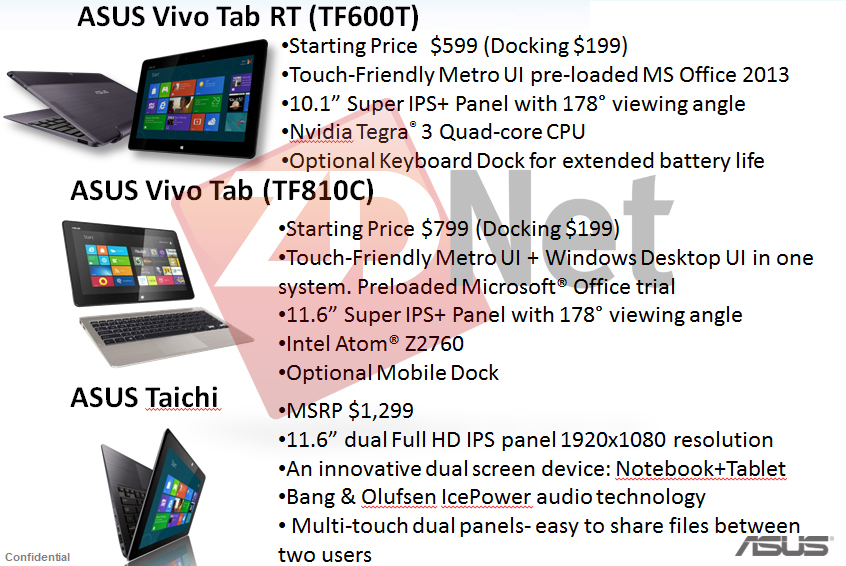
With Windows 8 scheduled to launch on October 26, we’ve still received almost no official confirmation of what devices running Microsoft’s new operating system will cost. But leaked information published today by ZDNet reveals that a trio of Asus touch-screen devices will cost anywhere from $599 to $1,299.
According to ZDNet, this leaked slide, marked confidential, contains “Asus’ holiday roadmap.”


Microsoft hasn’t yet revealed pricing for its own Surface hardware, but CEO Steve Ballmer hinted at a potential price range in an interview a few days ago with the Seattle Times. Ballmer said the Surface will be a “very competitive product from the features perspective,” and that when companies “offer cheaper, they do less.” The sweet spot in the “bulk of the PC market,” Ballmer said, is anywhere between $300 and $800.

The Asus Vivo Tab RT is an ARM-based device, pre-loaded with Microsoft Office 2013, starting at $599, according to the slide published on ZDNet. The price is higher than an entry-level iPad (Microsoft’s primary competition), but identical to the third-generation iPad with 32GB of storage. As we’ve reported before, the Vivo Tab RT will ship with 32GB.
While the 10" 1366x768 display won’t be as sharp as an iPad’s, customers might get a lot more productivity out of these devices if they buy the optional keyboard dock. According to the slide leaked to ZDNet, the keyboard dock adds another $199 to the price, bringing the total price in line with a lot of decent Windows PCs.

The Vivo Tab RT runs Windows RT, a version of Windows for ARM processors that includes the Metro touch interface and a subset of desktop capabilities, including Microsoft Office. The other two devices described in the leaked slide run Windows 8, the version for x86 processors that is fully compatible with all desktop applications.
An Intel Atom-based tablet called the Asus Vivo Tab will start at $799, with an optional keyboard dock for $199. This will come with a trial version of Microsoft Office, according to the leaked slide.

Finally, the Asus Taichi, a dual-screen device with an 11.6" 1920x1080 screen and Intel Core i7 processors, will have a suggested retail price of $1,299. Described at the recent IFA show in Berlin, the Taichi is nothing if not unique. It’s built like a regular laptop, except it has a display on both sides of the lid. Only the display on the rear is touch-enabled.
In addition to the published slide, ZDNet said the leaked Asus roadmap includes "details about 12- and 13-inch laptops," with one costing $549 and the other, an Asus Transformer, costing $1,399.

If the leaked prices are correct, Asus’ Windows 8 devices won’t be undercutting the market’s cheaper tablets such as Google’s Nexus 7 and Amazon’s Kindle Fire. That’s not a huge surprise, since Microsoft has been pitching Windows 8 and Windows RT as offering the best of both tablets and PCs. The idea of a $200 Surface tablet from Microsoft has been rumored, but based on Ballmer’s comments and the Asus leak it seems more likely that Windows 8 device makers will try to compete on features rather than price.
TECHNOLOGY NEWS UPDATE

Microsoft pushes home users toward Office subscriptions—whether they like it or not

Would you pay $99 a year to use Office at home?

Office 2013 is going to be, for most users, a fairly minor evolution of Microsoft's flagship productivity suite, except for one little thing: with Office 2013, Microsoft is pitching Office subscriptions to consumers.
The company has already been courting enterprise users with its Office 365 platform for a little over a year now. There are multiple price tiers, with enterprise users getting some combination of Exchange, SharePoint, Office Web Apps, and the desktop Office suite.
In addition to these enterprise-oriented offerings, the company today unveiled two non-enterprise plans. For $99.99/year, there's Office 365 Home Premium, giving Word, Excel, PowerPoint, OneNote, Outlook, Publisher, and Access, plus an extra 20 GB of SkyDrive storage (in addition to the 7 GB that you get for free), plus 60 minutes of Skype calls per month. This is licensed on a per-household basis, and one account can be shared by up to 5 users across any mixture of five PCs and Macs.
The other new subscription is the $149.99/year Office 365 Small Business Premium. This adds Lync and InfoPath into the software mix, but changes the cloud services. Instead of SkyDrive and Skype, Small Business Premium users will get a 25 GB mailbox, shared calendaring, 10 GB of shared (company-wide) storage, and another 500 MB of storage per user. This is licensed per user, but that user can install on any combination of PCs and Macs, again up to a total of five systems.
Microsoft hasn't released the full details of the subscription schemes. What happens to your data after your subscription expires, for example, is unknown at this time.
This is just a first tentative step into the world of home user subscriptions, and for those not willing to bite, Microsoft will offer traditional perpetual licenses. Office Home & Student, for $139.99, starts with Word, Excel, PowerPoint, and OneNote. Office Home & Business adds Outlook, for $219.99. And Office Professional will give users Publisher and Access as well for $399.99. All are licensed on a per device basis, and can be installed on one PC (or, for Home & Student and Home & Business, a Mac).
Office 2013 is still in beta, but Microsoft has said that the final version will start shipping to Windows RT users in November. The more-capable Intel-compatible versions seem likely to arrive some time later: starting October 19, anyone buying Office 2010 or Office for Mac 2011 will also qualify for an upgrade to the equivalent version of Office 2013.

Is there actual value in these subscriptions?

Subscription software of one form or another has proven popular in the enterprise (whether it be cloud services, like Office 365, or subscriptions to desktop software, such as Microsoft's Software Assurance scheme). But so far it's a rarity in the consumer space. Anti-virus software has tried to bully and cajole users into getting aboard the subscription train, but the large number of users with out-of-date anti-viral protection suggests users are resisting.
The company offers various scenarios to illustrate how the subscription pricing ends up giving you more functionality for less money; if you use multiple computers, or care deeply about always having the current version, the subscription prices do tend to undercut the perpetual licenses. However, this is largely due to the changes the company has made to the pricing of those perpetual licenses.
Households, in particular, face a steep price rise. Office 2010 has two Home & Student editions. There's a single user, single PC version for $119.99, and a per-household version good for three PCs, for $149.99. The perpetually licensed 2013 equivalent is $20 more than the single user, single PC edition, and there's no perpetually licensed household edition at all. The new household subscription does allow the use of five PCs instead of three, but you're going to be paying that $99 every single year. Assuming Office continues to be updated every three years or so, that's going to cost a three PC household about $300 every three years, instead of $150.
Similar pricing breaks were available for multiple copies of other editions of Office 2010; they too are now gone, with similar results. Office is, for many users, going to get a lot more expensive.
With these changes, Microsoft gets to push the subscriptions as "better value"—the full Office suite for five PCs for $99 per year, instead of $2000 for five perpetual Office Professional licenses—even though they're considerably worse value than the Office 2010 pricing offered. If you don't want to incur recurring charges, and just want the confidence that comes of buying now and using the software indefinitely, you're going to pay, possibly a lot more, for the privilege.
Sure, Microsoft argues that there are various sweeteners in the deal—subscribers all get Outlook, Publisher, and Access, for example, which weren't previously available in the Home & Student edition. But if home users have been happy without those applications in the past, that's probably a sign that they don't really need them now. Microsoft wants it both ways, it seems; on the one hand, it maintains that what it calls the "Core Office applications" (Word, Excel, PowerPoint, OneNote) are all home users and students should want or need. On the other, it's claiming the extra applications are, in fact, valuable and worth paying the extra. Either they're not that valuable after all, or the Office Home & Student product is deficient in important ways and nobody should have been using it (or, for that matter, selling it) for all these years.
As another incentive to subscribe, and one that might leave a bad taste in the mouth, the company says that subscribers will be given unspecified "updates" to add new features and capabilities over the life of their subscription. Perpetual licensees will only get bug fixes and security updates.
On top of all this, you might not even need to buy Office to use it at home. When licensed through Software Assurance, enterprises can, for a small additional fee, obtain access to the "Home Use Program." For $9.95 per license, anyone entitled to use Office at work can also use that same edition of Office at home. Even if the employer passes that cost on to the employee, it's plainly a great deal cheaper to go that route than it is to buy any of the other licenses.
The Small Business pricing, though a bit steeper, seems more compelling. Small businesses never had a deal as good as the three-for-$150 edition, and are more likely to gain value from applications like Access, and features like shared calendaring. The model makes more sense for this market.

The other way to get Office

With this pricing, Microsoft is not only bringing subscription pricing to home users; it's also bringing an incentive—an incentive that's arguably more stick than carrot—to abandon the perpetual licensing. The big question is whether consumers follow their enterprise counterparts onto the treadmill. The risk for Microsoft here is not that they don't go for the subscriptions; it's that faced with a bunch of unappealing options—being on the hook forever with the subscription, or paying through the nose with the perpetual licenses—users may decide they don't need Office at home at all.
At least, not for their PC. Because there is a third way of getting Office: Windows RT. Windows RT will ship with Office Home & Student. Just those four core applications again, but they come built-in, for no additional cost. Perpetually licensed, with no subscription. They'll be an expensive way of getting Office Home & Student, certainly (we don't know the pricing yet, but it'll be more than $139.99, that's for sure). But it could be a nice cheap way of getting a whole new computer with a "free" copy of Office.
We haven't been convinced of the amount of value that Office actually adds to Windows RT. If people buy Windows RT devices just for browsing the Web, sending a few e-mails, and watching videos, the presence of Office won't be that big a deal. But if Windows RT becomes the best way of getting Office in your home, the pressure to use Windows RT tablets for more, and the value that Office RT adds to the package, becomes that much greater.

Office 2013 arriving in November, at least for some

yahoo